BuildReady: exam prep they finally own
An education sector client ran its exam prep through a rented LMS — content locked in, formats limited, no view of how students were going. We extracted the question bank and rebuilt it as BuildReady, run day to day by the client's own team.
The story in a minute
From a rented LMS to a platform they own
The Situation
Renting shelf space in someone else's system
The client prepares its members for high-stakes industry exams — all of it through a third-party LMS that held the entire question bank and decided what was possible with it.
The limits showed everywhere. The formats that mattered most — questions built around real technical documents and drawings — weren't supported. Topics couldn't be reorganised without fighting the platform. And trainers couldn't see who was struggling, so support was guesswork.
The real problem
The client's most valuable training asset was locked inside someone else's product, on someone else's roadmap, at someone else's pace.
The Diagnosis
Own the content, then own the experience
The first job wasn't code — it was getting the content out. The full question bank was extracted from the legacy LMS into clean, structured data the client owned outright.
Then the workflows were mapped with the people who'd use them: students needed practice that matched the real exam; trainers, sight of how each student was going; the content team, publishing without a developer.
Two apps, one platform
A student-facing app and a staff-facing studio, sharing one database and one source of truth. Five moves.
You're thinking
"Our content is locked in the old system."
01
Extract the question bank
The entire bank, scripted out into structured, portable data — from then on, the platform is built around content the client owns.
You're thinking
"Will practice actually feel like the exam?"
02
Build the student experience
Mock exams that mirror the real thing, topic practice and state-specific variants — including the document- and drawing-based formats the old platform couldn't do.
You're thinking
"Can our team run it without a developer?"
03
Build the Studio
Staff author in any format, bulk-import from Excel — a tool the team already lives in — and organise topics. Publishing is one click, not a ticket.
You're thinking
"How do trainers know who needs help?"
04
Give trainers a live view
Every student's attempts, strengths and weak topics, live — so trainers know who needs help while there's still time to give it.
You're thinking
"Can AI help without dropping the standard?"
05
Add AI-assisted drafting
A Copilot agent drafts candidate questions from the client's own reference library — and staff review, edit and approve every one before it reaches a student.
The Question Engine
Ten ways to ask a question
Real exams don't stick to multiple choice, so practice can't either. Ten formats, each built because the material needs it — including tasks that put a real technical drawing in front of the student.
Three audiences, one source of truth
Real BuildReady screens, demo data throughout — the student, the trainer and the content team all reading the same live facts.
You're thinking
"Will my team actually use it?"
01
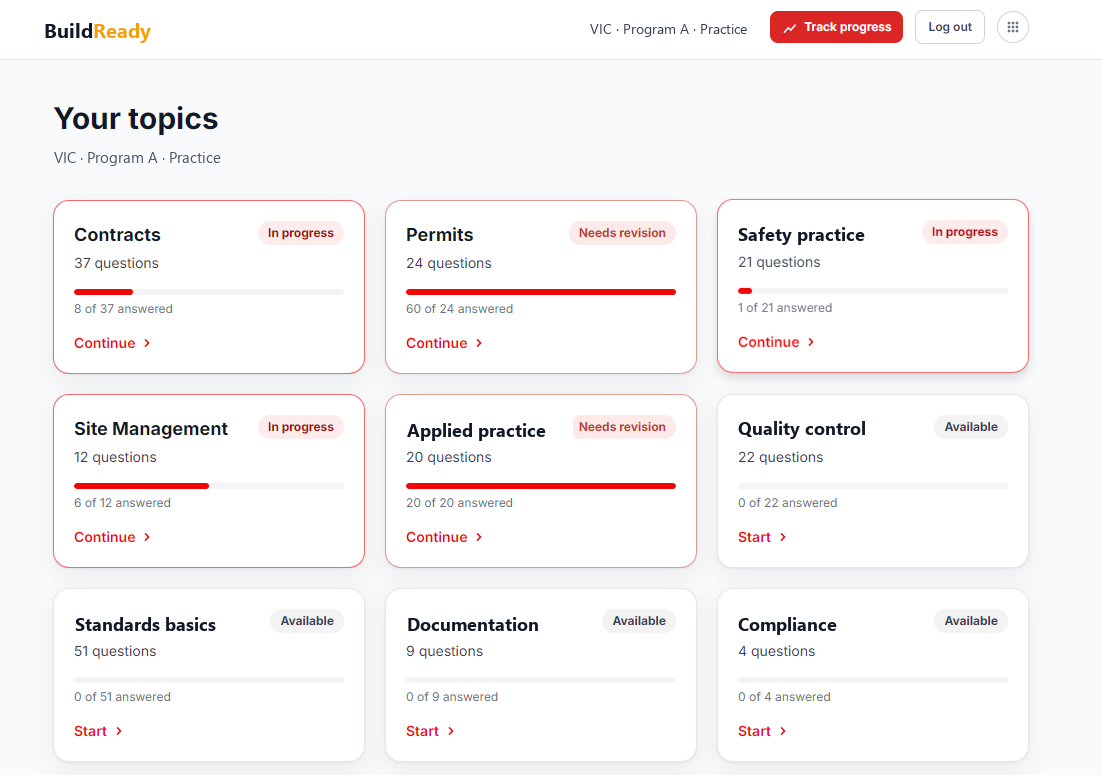
Pick a topic, press start
Students land on their topics — every card shows where they're up to, ready to continue.
You're thinking
"How do we know it's working?"
02
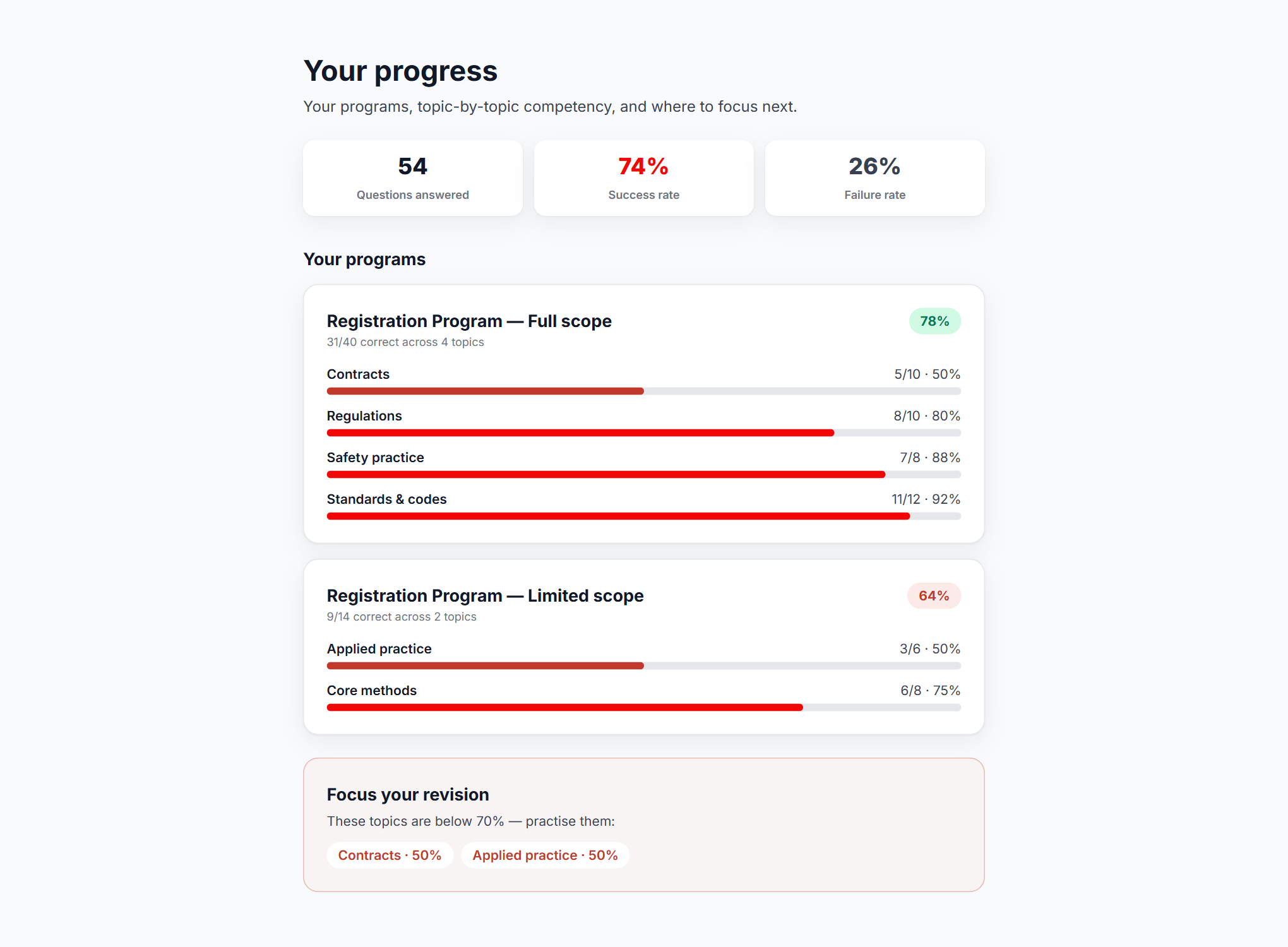
Progress that tracks itself
Every answer rolls up into topic-by-topic competency, with a revision nudge on whatever is below the line.
You're thinking
"Which student needs help before exam day?"
03
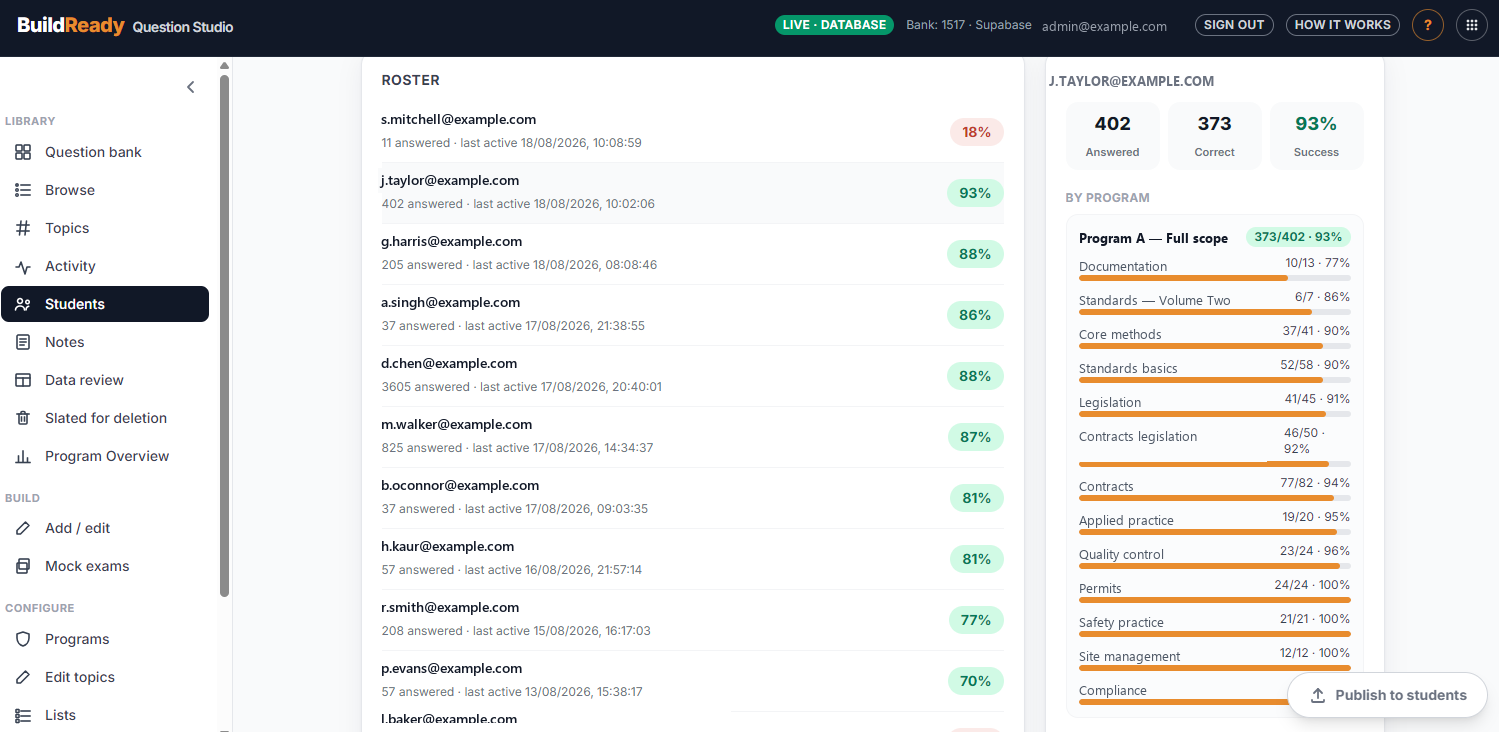
The roster tells you who to call
Trainers see the cohort at a glance, then drill into any student's per-topic story — so the struggling student gets a phone call before exam day, not a commiseration after it.
You're thinking
"Who keeps the questions honest?"
04
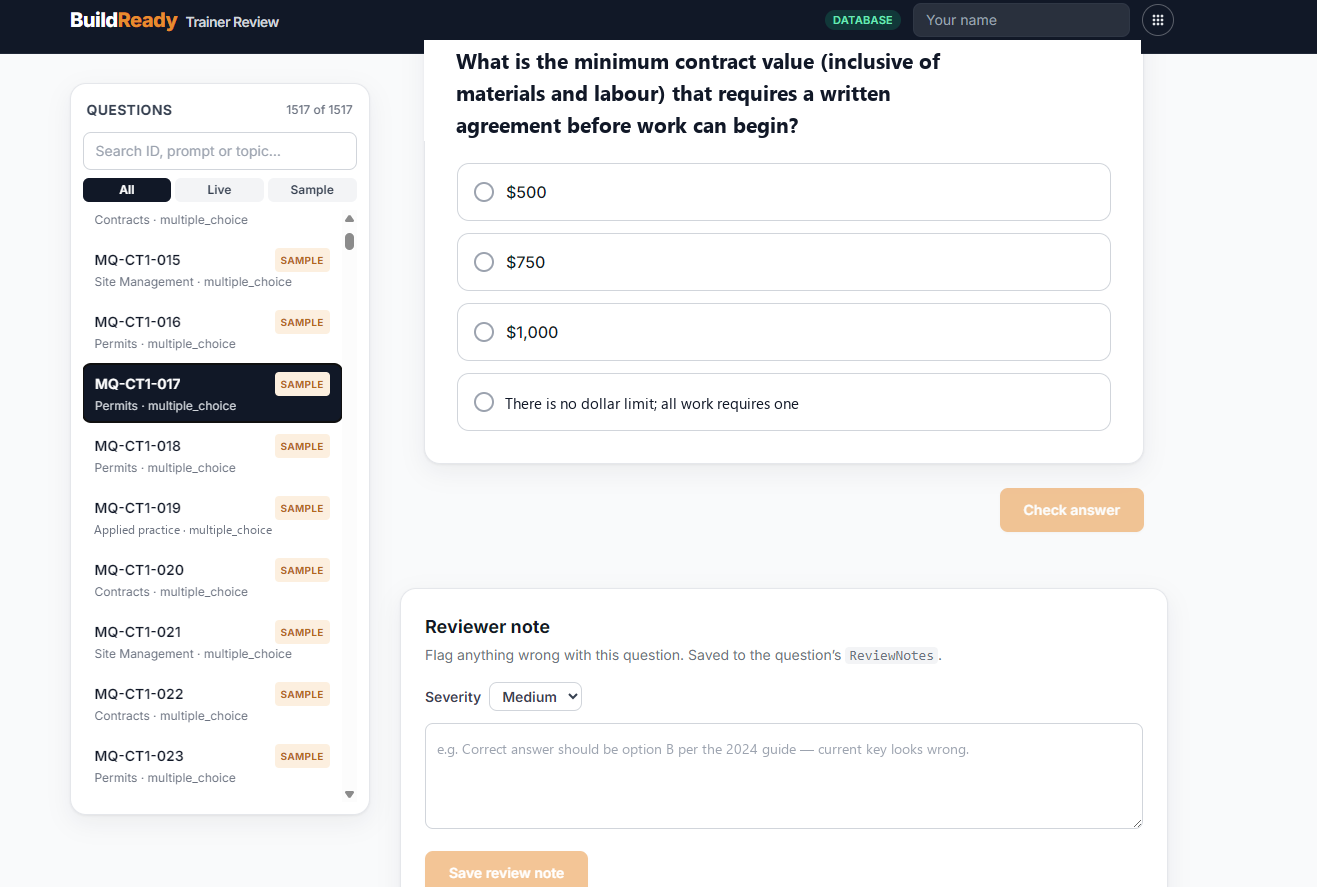
Trainers review every question
Anything wrong is flagged with a severity and a note, straight onto the question record.
You're thinking
"What should we write next?"
05
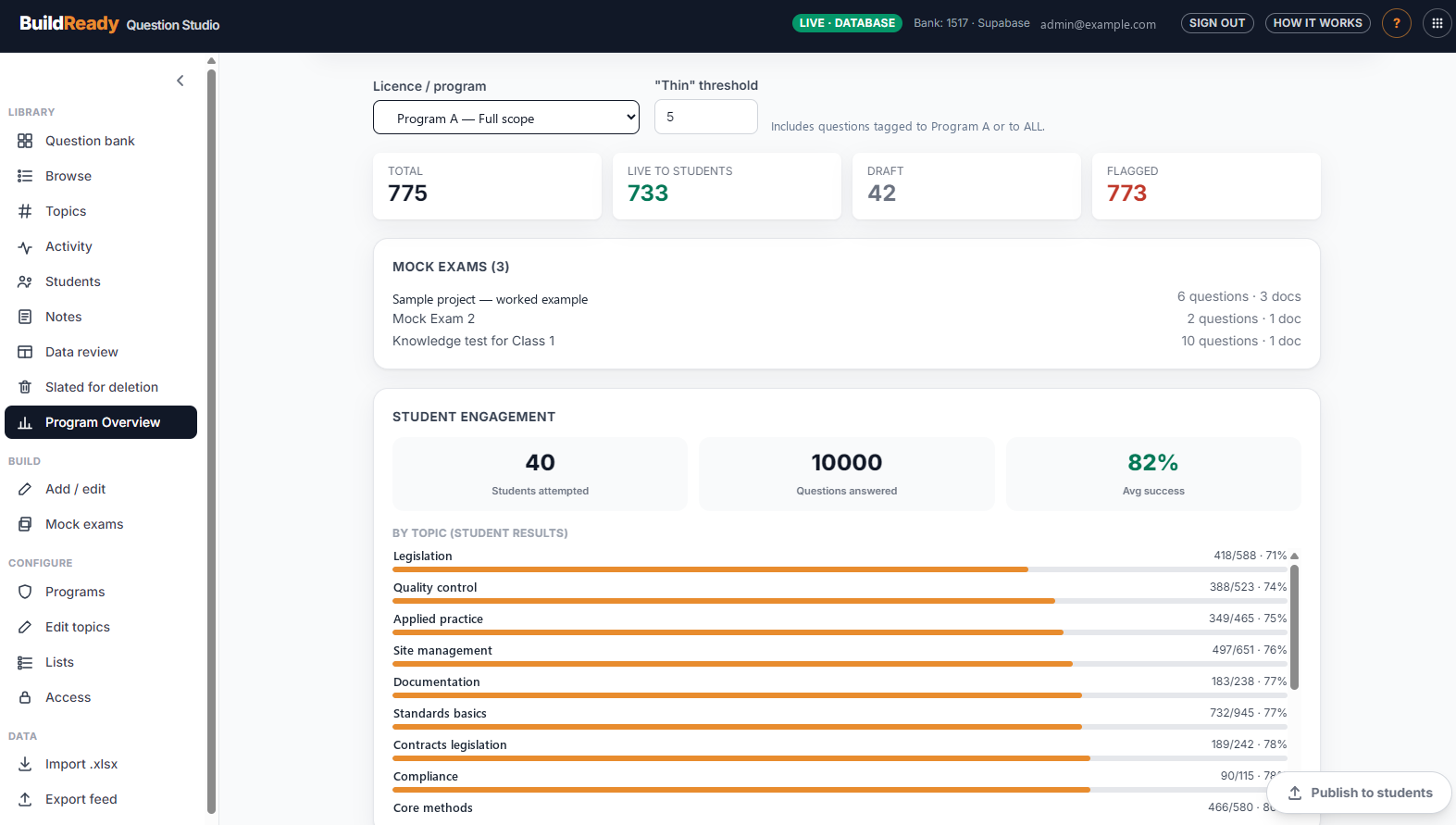
The program audits itself
Bank totals, live versus draft, and how students actually score by topic — thin coverage is flagged, so the team knows the next job.
You're thinking
"Do we need a developer every time?"
06
Assemble, publish, done
Mock exams are drag-and-drop; the finished update goes out as a versioned feed students read immediately — no developer in the loop.
Under the Hood
Modern stack, two front doors, one set of rules
For the technically curious: BuildReady is a React app on Vercel, with Supabase (Postgres) as the single source of truth. Access control lives in the database itself — row-level security decides who can see and change what.
Authentication has two front doors:
The members' door
Students sign in through the client's existing membership system — the account they already use, no second password, no separate user list.
The staff door
Staff access follows the organisation's own Microsoft accounts — when someone joins or leaves, IT already controls it.
The Scope
Everyone touches the same platform differently
| Audience | What changed for them |
|---|---|
| Students | Practice that matches the exam they'll sit, their progress in front of them |
| Trainers | A live view of how every student is going — support lands in time |
| Content team | The Studio — author, organise, check coverage, publish |
| Administrators | Access through the organisation's own accounts — no shadow logins |
| The content | Versioned, portable and re-usable — an asset that now outlives any one platform |
The Outcome
Their content, their platform, their pace
BuildReady is live, student feedback came back positive within weeks, and the roadmap now belongs to the client. That's the kind of build we do: it ends with the client holding the keys.
If your content lives in someone else's product,
it's not really yours.
Subscription platforms are a fine way to start — and a costly place to be stuck. A free 30-minute call will tell you honestly whether owning your own is worth it.