The whole business on one screen
Ten browser tabs every morning, and the picture only ever assembled in one person's head. So we built the AM Ops Hub — a cockpit reading live from every system we run, ranking next moves against our goals, and never acting without a human click.
The story in a minute
Ten tabs to one pane, start to finish
The Situation
A scattered brain and a screen full of windows
Every morning started the same way. Xero for cash and who hadn't paid. SharePoint for the pipeline and the task list. Outlook for enquiries, Bookings for the day's appointments. Analytics for the website. Cloudflare and GitHub to remember what we actually run. LinkedIn, because that's where the referrals come from.
Ten tabs, ten sign-ins, ten different ideas of what "recent" means — and only then could the real question be answered: what should I do today?
Nothing was missing — that's what made it hard to see. Every number existed and lived in the right system; the products just don't talk to each other. So assembly fell to a human, daily. And the problems that only show up when you compare two systems — an invoice quietly ageing, a domain about to expire, a warm enquiry off the board — got found late, or by accident.
The real problem
The data wasn't missing — it was distributed. Ten systems each held a true fragment, and the only place they were ever assembled was in Peter's head: rebuilt every morning, from scratch, and never written down.
The Diagnosis
Sense, then recommend, then act — in that order
The tempting build here is a database: pull everything into one place and report off it. We deliberately didn't. A second copy of the business is a second thing that can be wrong, and the day it disagrees with Xero you stop trusting the dashboard rather than fixing it.
So the hub owns almost nothing. It's a window, not a warehouse — every figure is fetched from its system of record the moment you look. The only things stored are what no other system holds: the estate, the map of how it connects, and the goals.
On top sits a three-layer shape: Sense, read-only plumbing. Recommend, a model ranking next moves against the goals. Act, a narrow gate that only opens under a human hand.
Six moves from ten tabs to one pane
The hub wasn't planned as a suite — each tile earned its place by replacing a tab that was being opened anyway.
You're thinking
"Do we even know everything we run?"
01
Name the estate first
Every website, repository, product and paid tool went into one register with an owner, a status and a link. A nightly scan compares it against reality and proposes additions — it never edits the register itself.
You're thinking
"Won't this just become another thing to update?"
02
Plumb the live sources
Pipeline, clients, tasks and hours from SharePoint. Cash and receivables from Xero. Enquiries, bookings and calendars from Microsoft 365. Traffic from Analytics. Nothing is entered twice — the hub only displays what the source already says.
You're thinking
"What about the stuff that fails quietly?"
03
Watch the machinery
Three tiles exist to stop bad surprises: System Health pings every backend, Registers watches domains and renewals, and Usage shows how close each platform limit is — while there's still time to act.
You're thinking
"Ranked by what, exactly?"
04
Write the goals down
An AI can't tell you what matters — you have to. The goals live in the hub, editable, laddered across monthly, yearly and five-year horizons: the yardstick everything else is measured against.
You're thinking
"Is the AI bit just decoration?"
05
Ask one honest question
Insights bundles every feed plus the goals and asks Claude one question: given all this, what should be done next? Ranked recommendations, each citing its data, only ever on a click — with the run's few-cent cost printed on screen.
You're thinking
"What stops it doing something stupid?"
06
Build the gate before the automation
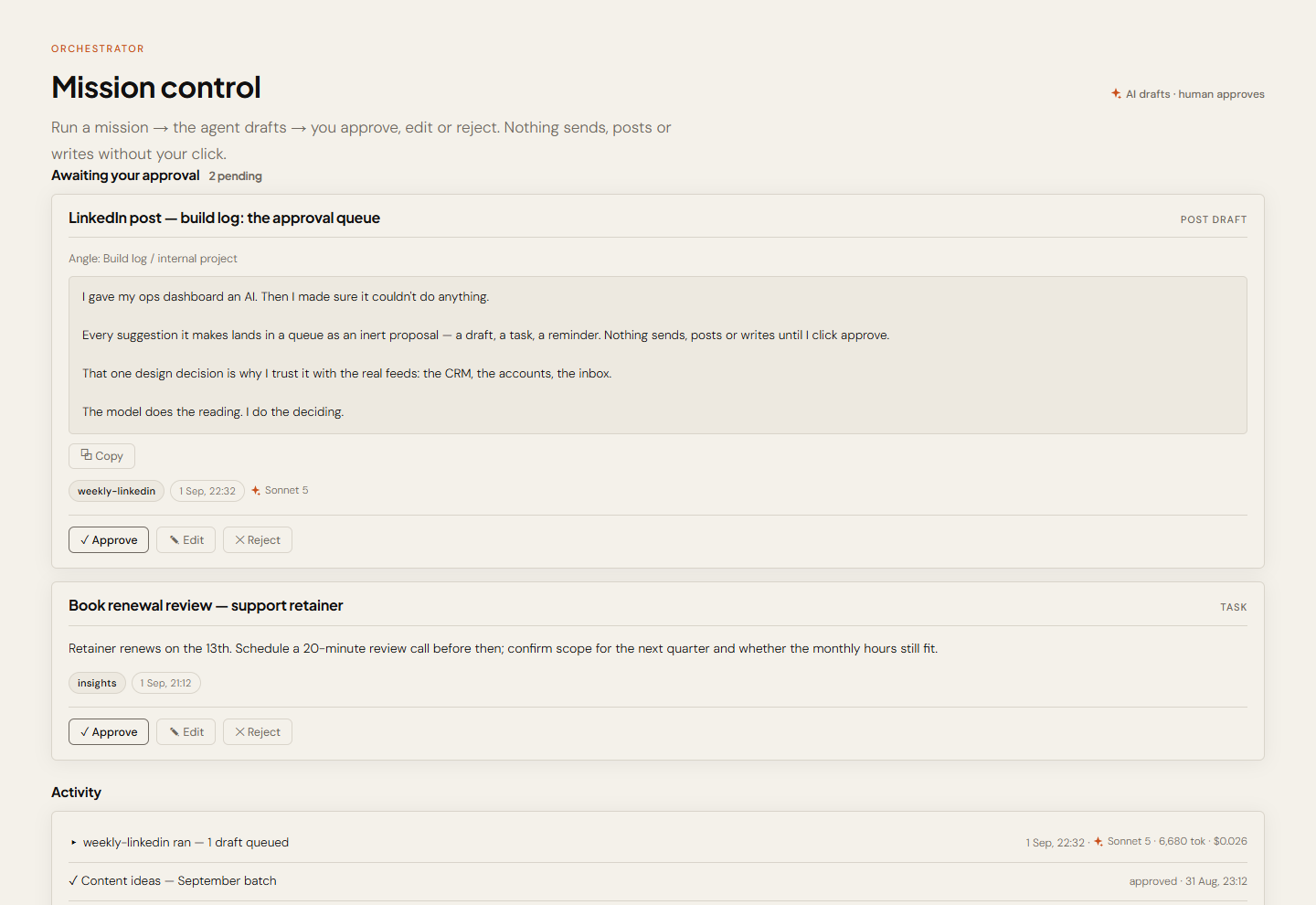
The Orchestrator turns suggestions into proposals — a task, an invoice chase, a post — each inert until a human approves, edits or rejects it. The gate isn't a rule someone might bend; it's how the code is shaped.
Six tiles, one morning
The actual hub, tile by tile — the same screens we open every day. Client names and figures are generalised throughout. Scroll through the story.
You're thinking
"Where does the business actually stand today?"
01
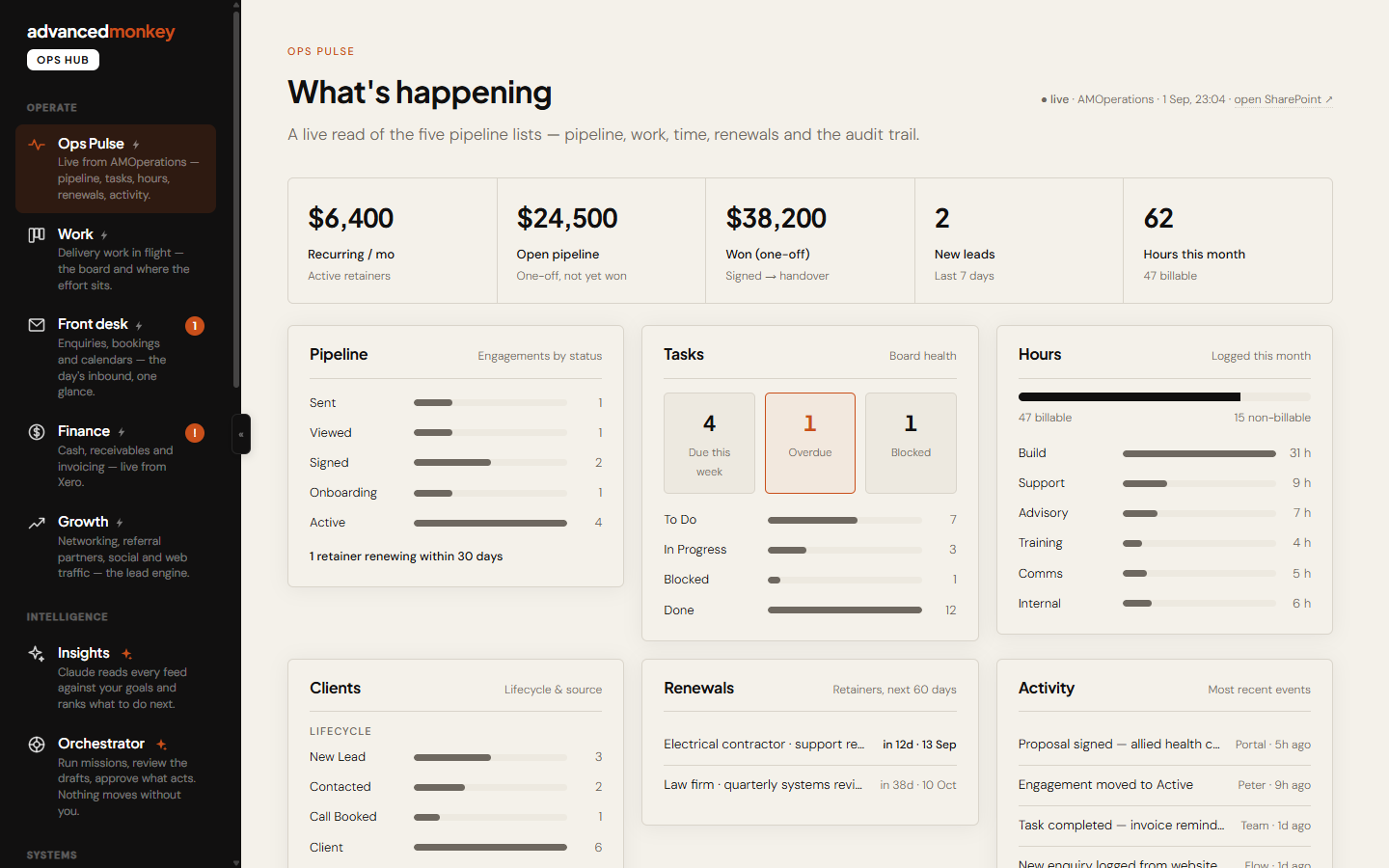
Ops Pulse — the state of play
Pipeline value, engagements by status, recurring revenue, hours, renewals due, and the activity log underneath — live from the SharePoint lists, so it agrees with the CRM by construction.
You're thinking
"Did anything come in overnight?"
02
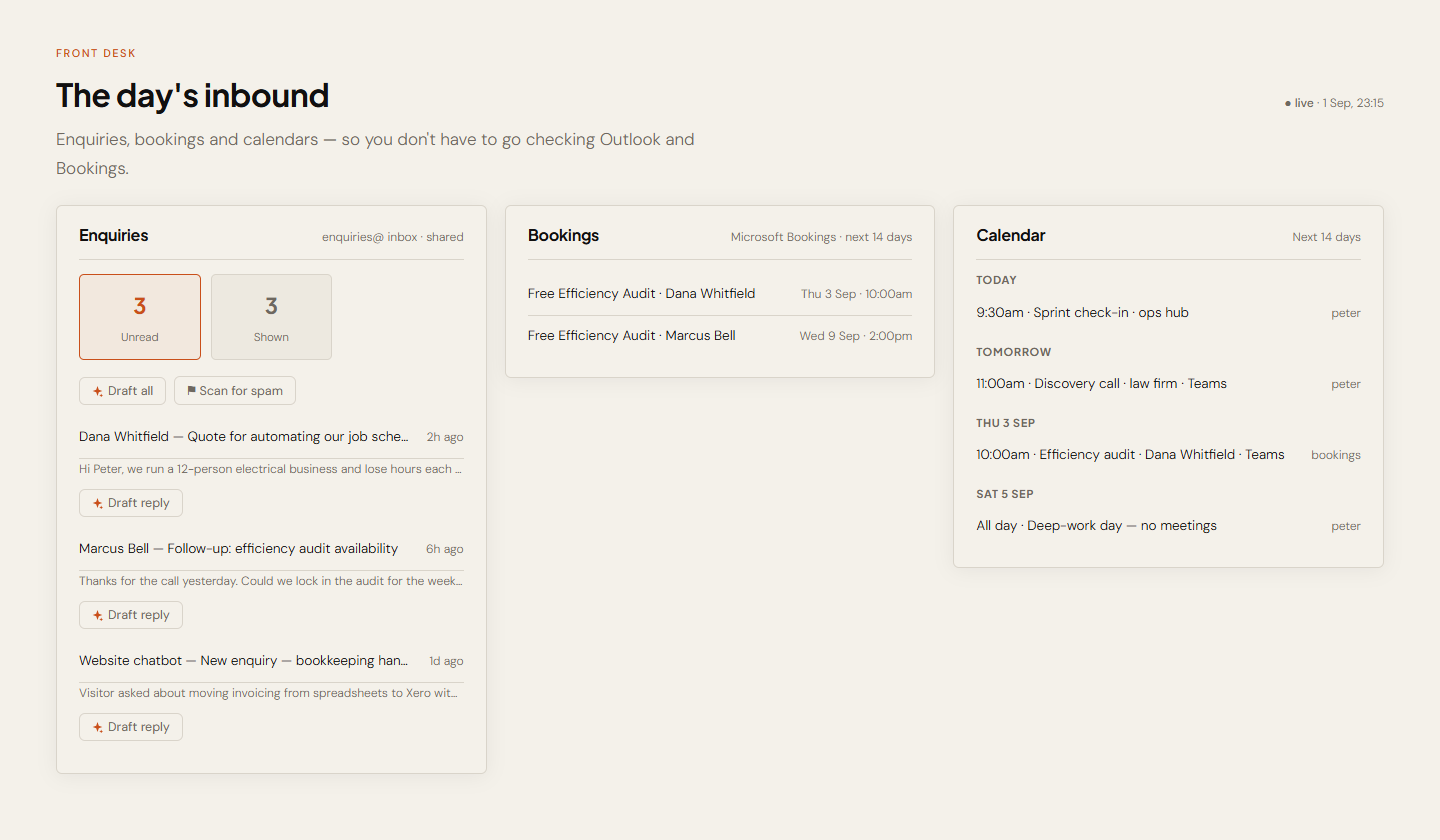
Front desk — the day's inbound
The enquiries mailbox, the fortnight's Bookings and the merged calendars on one card — plus a thin AI overlay that drafts replies into Drafts and flags likely junk. The send permission was deliberately never granted.
You're thinking
"Who hasn't paid, and can I cover next month?"
03
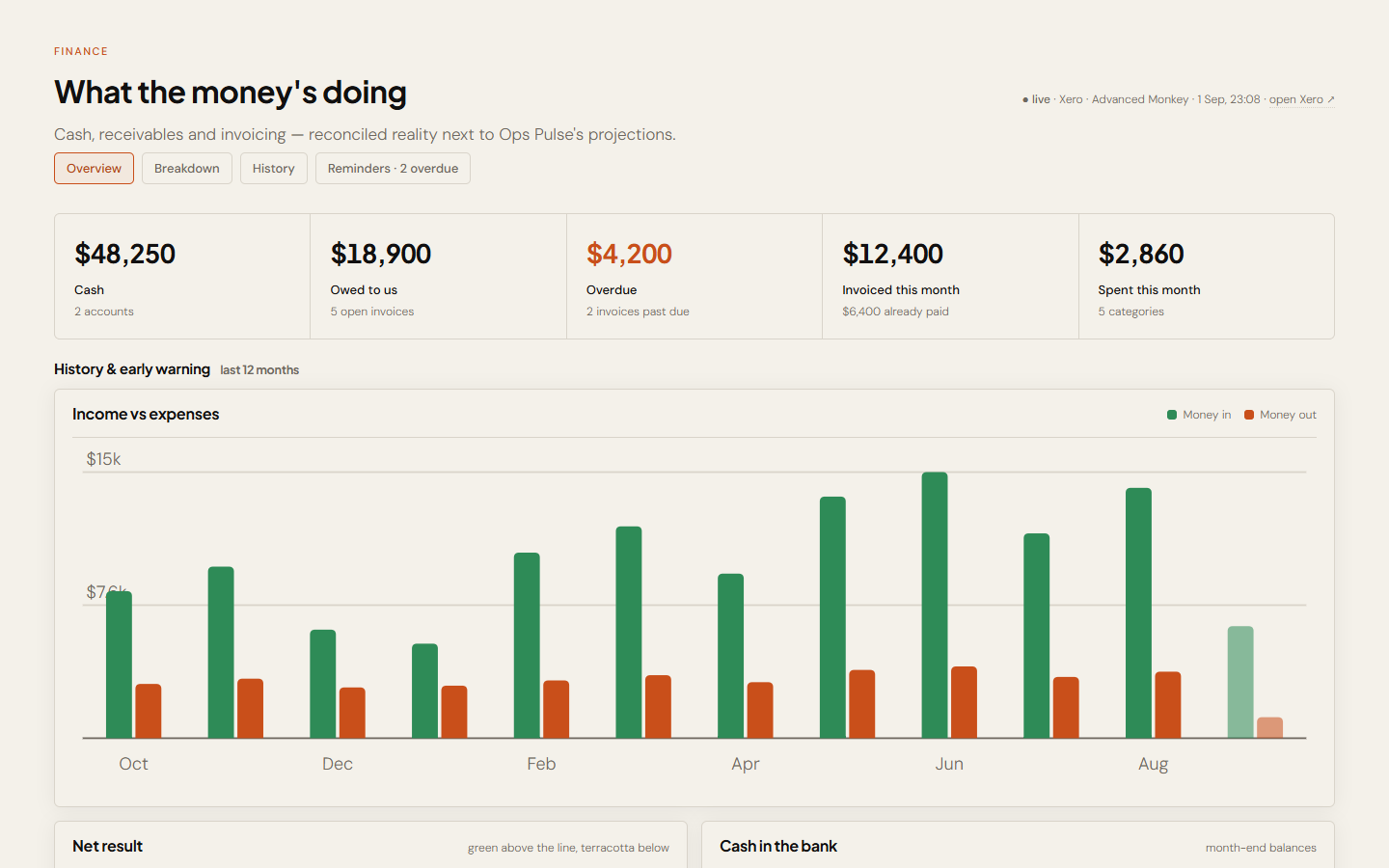
Finance — cash, live from Xero
Cash, receivables, overdue ageing, spending by category and twelve months of history with early-warning flags. Chasing an invoice queues a proposal — approve it and Xero itself sends, from the real account.
You're thinking
"Fine — but what should I actually do first?"
04
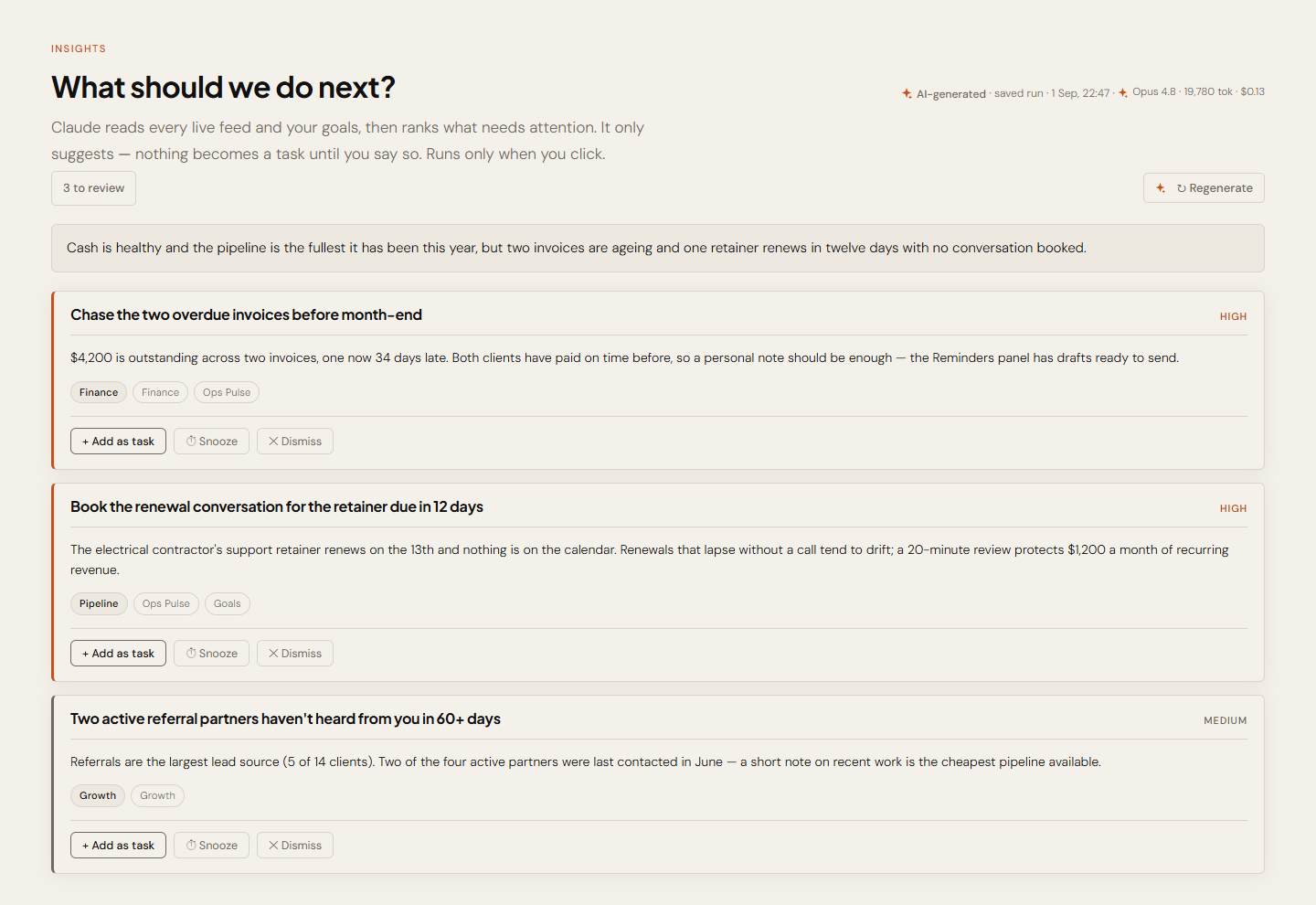
Insights — ranked, and it shows its working
The ranked list, live — with the house steering prompt visible and editable on the same screen. When a recommendation is wrong, you fix the instruction rather than distrusting the tool.
You're thinking
"And it can't do any of that behind my back?"
05
Orchestrator — nothing moves without you
Each proposal renders as a card you can edit before deciding; approval executes in the source system, and every decision is logged. Missions that need no language skip the model entirely — and cost nothing.
You're thinking
"If I change this, what else breaks?"
06
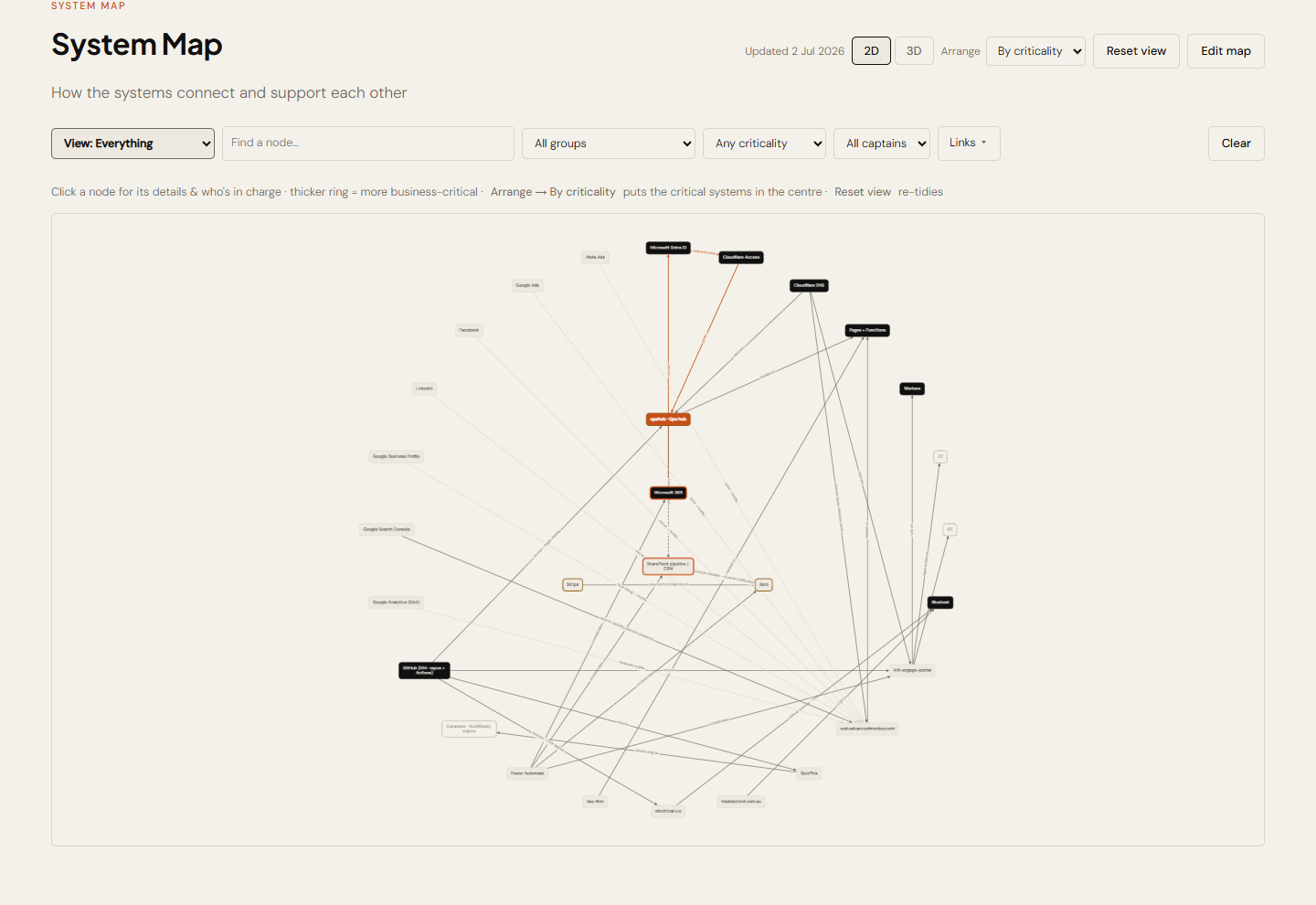
System Map — how it all connects
Every system and its relationships, in 2D or 3D, editable in the browser — validation refuses to save a map with dangling connections. The tile that answers "what depends on that?" before a change, not after.
The Tiles
Fourteen tiles, four groups, one rule
The rule: a tile only appears when real data is behind it — if it's in the nav, it works. Adding the next one is a config entry and a view module, which is why the list grows without the shell being rewritten.
Operate — the day
Ops Pulse Live pull
Pipeline, clients, tasks, hours, renewals and the activity log — read live from the operations lists in SharePoint.
Work Live pull
Delivery work in flight: the status board and where the effort actually sits, broken down by project.
Front desk Live pull
The enquiries mailbox, the next fortnight of Bookings appointments and merged calendars — plus optional AI reply drafting and spam flagging, both human-approved.
Finance Live pull
Cash, receivables, overdue invoices, spending by category and twelve months of history with early-warning flags. Chase reminders send through Xero on approval.
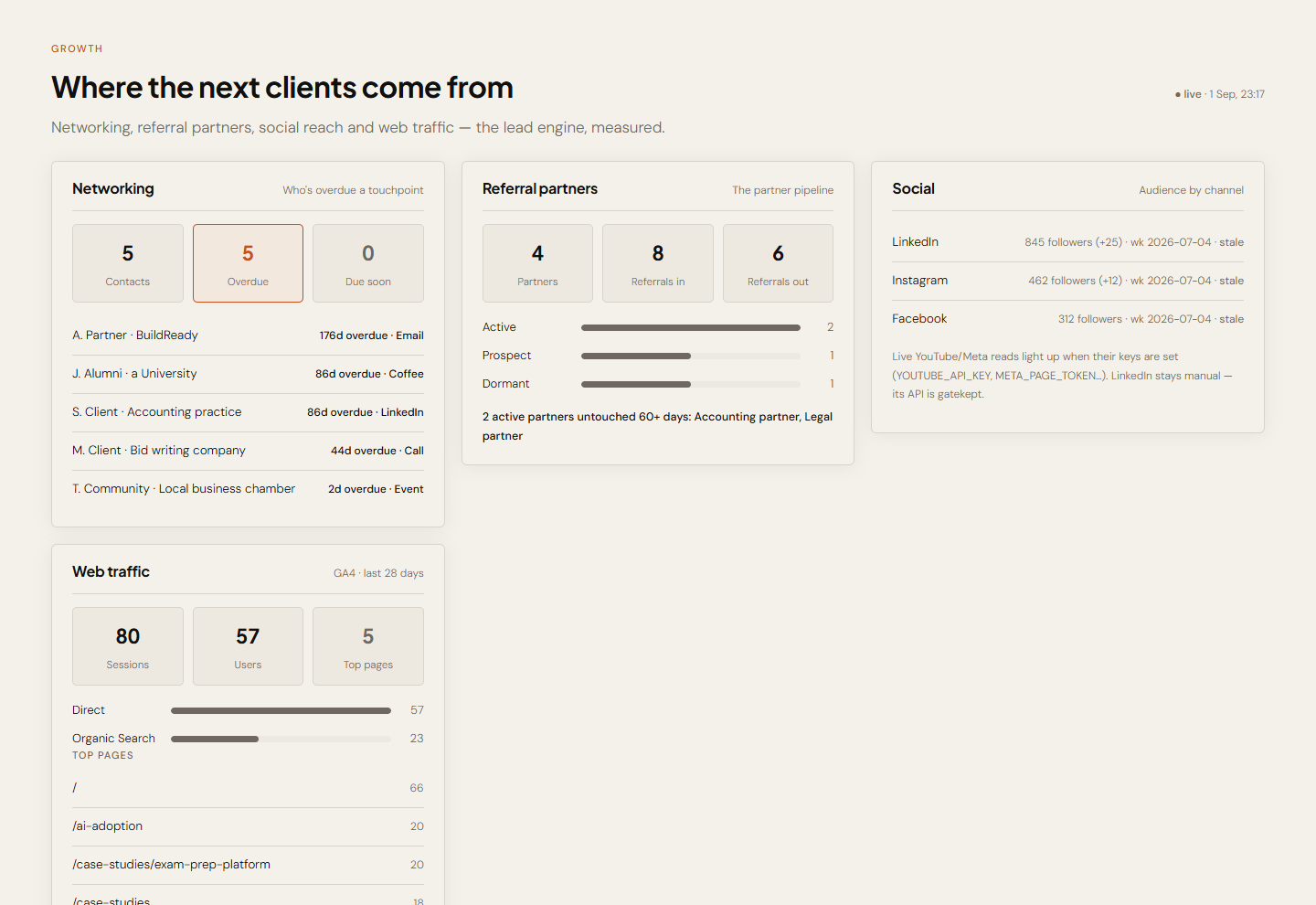
Growth Live pull
Networking, referral partners, social and web traffic — the lead engine, with Analytics sessions and top pages over the last four weeks.
Intelligence — the judgement
Insights AI
Ranked recommendations against the written goals, each citing its source — on a click, cost shown.
Orchestrator AI
The approval queue: proposals in, human decisions out, everything logged.
Systems — the machinery
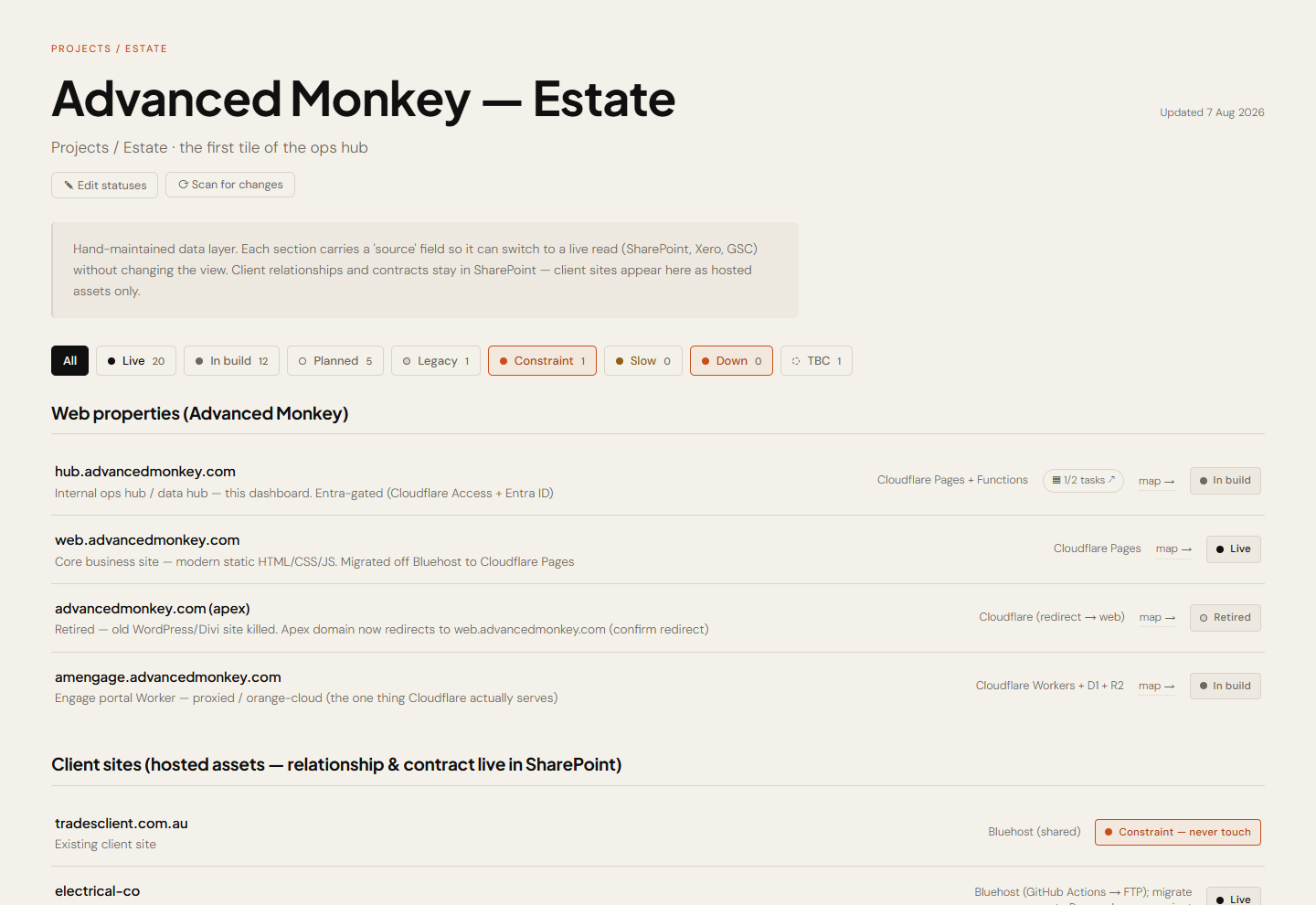
Projects / Estate Curated
Every site, repo, product, system and tool with its status and links. A nightly read-only scan of GitHub and Cloudflare proposes what it finds missing.
System Map Curated
The connection graph in 2D or 3D, editable in the browser with validation.
System Health Live pull
Live reachability and latency across every backend, so an outage is something you see rather than something a client tells you about.
Registers Live pull
Domains, expiry dates and the assets behind the estate — the tile whose entire job is making sure nothing quietly lapses.
Usage Live pull
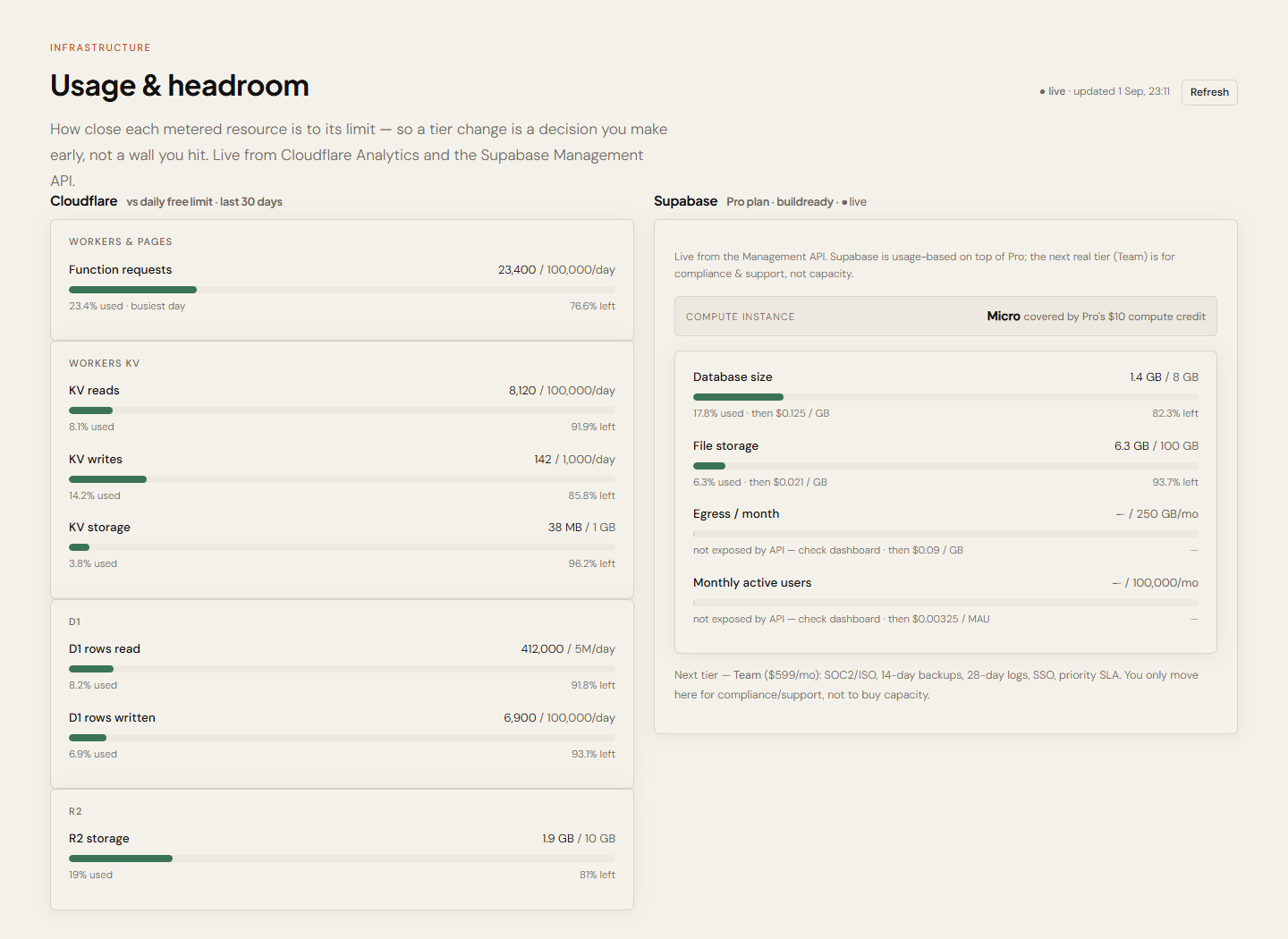
Cloudflare and Supabase headroom — how close each platform limit is, read from the platforms themselves, before a ceiling becomes an incident.
Reference — the receipts
Data Live pull
The raw rows behind every dashboard, each linking to its SharePoint edit form — check a wrong number in ten seconds.
How it works Curated
The whole system in plain language — every source, what the AI may and may never do. Written for us, and for any client we show it to.
More Screens
Three more the walkthrough skipped
The estate register the whole thing is built on, the lead engine, and the tile that watches the platform limits.
Under the Hood
No server, no second database, no shadow logins
For the technically curious: static files on Cloudflare Pages, one small server function per integration — on demand, fractions of a cent, nothing to patch. A tiny key-value store holds what no other system owns: goals, estate, map, the approval queue. Publishing is a git push, live inside a minute.
Access is handled in two places, and neither of them is application code:
The front door
Cloudflare Access enforces Microsoft Entra sign-in at the network edge, default-deny — unauthenticated requests never reach the code, so the app ships no login screen or password logic at all.
The service doors
Every integration gets the narrowest identity that works: one SharePoint site, read-only analytics, a Xero connection whose only write is "email this invoice". Credentials stay server-side — none reach the browser or the repository.
The Scope
The questions it answers, and where each answer comes from
| The question | The tile, and the system behind it |
|---|---|
| "Where does the business stand?" | Ops Pulse — pipeline, engagements, recurring revenue, hours and renewals, live from SharePoint |
| "Can I pay for next month?" | Finance — cash, receivables, overdue ageing and twelve months of history, live from Xero |
| "Did anything come in?" | Front desk — the enquiries mailbox, Bookings appointments and merged calendars, live from Microsoft 365 |
| "Is anything broken or about to lapse?" | System Health, Registers and Usage — reachability, domain expiry and platform headroom |
| "What should I do next?" | Insights — ranked next actions, each citing its data |
| "Can I get it done from here?" | Orchestrator — approve, edit or reject; approval executes and is logged |
| "If I change this, what breaks?" | System Map — the connection graph, editable in the browser and validated before it saves |
The Outcome
One screen, one sign-in, and a much quieter head
The honest result isn't a percentage — the morning reconstruction simply stopped happening. The picture is on screen before the coffee, the quiet problems are watched continuously, and "what should I do next?" has an answer that shows its working.
Built for us and run daily, this is the most honest demonstration we have — and the working prototype of what we build for clients: your whole operation on one screen, with an AI that suggests and a human who decides.
If the full picture only exists in someone's head,
it isn't a system — it's a risk.
Most businesses already have every number they need, scattered across products that don't talk. A free 30-minute call will tell you honestly whether one pane is worth building for yours.