Every new hire in one place, and you can see whose court it's in
A social-work-led mental health practice with two clinics and a telehealth team hires only a few people a year. Each one ran through four systems, a dozen email threads and nobody's single view. We built them the Onboarding part of AM-OS, inside their own Microsoft 365. Here's what it replaces and how it works.
The walkthrough, in about a minute
Nine stages, two hard stops, one page for the candidate
The Situation
Four systems, a dozen threads, and no one view
Sixteen staff across two clinics and telehealth. A handful of hires a year, every one of them a clinician who has to be checked properly before they see a client. And every hire was run from the inbox.
A resume arrived by email. Interview times went back and forth. An offer letter went out, came back with questions, went out again. Referees were chased by phone and email, one at a time. Then verification: a police check, a Working with Children Check, AHPRA or AASW registration, professional indemnity insurance and qualifications, each arriving in its own thread, each re-sent when a scan was unreadable.
The same details were then typed into Xero, the practice software, Microsoft 365 and the website. And at any given moment the owners couldn't tell, without asking, who was holding a candidate up: them, the admin, the candidate or a referee.
The real problem
A few hires a year is exactly the volume where nobody builds a system, so each one is reinvented from the inbox. The hours hide in re-typing, chasing and version-hunting. They're invisible, so they never get fixed.
The Diagnosis
Map the loops before touching a tool
We mapped the whole lifecycle with the team first, from a resume landing to a clinician's first week. Most of the pain wasn't the steps. It was the loops: scheduling, offer back-and-forth, referee chasing, and worst of all verification, where four documents bounced across separate threads with re-uploads in between.
Two decisions came out of that map, and they shaped everything built afterwards:
- The stage is the only thing stored. "Who is this waiting on" is worked out from the stage and the state of the record, never typed in. A flag someone sets by hand rots within a month, and then the board lies.
- Sensitive details never enter the system. Tax file numbers, bank accounts and super go straight into Xero's own new-starter onboarding. The portal holds only the compliance documents, which is all it needs to.
The stack followed from the volume: SharePoint lists and a document library in the practice's own Microsoft 365, with a small web app in front for candidates. No Power Apps, no Dataverse, no second database. Automate where it's reasonable, not the whole process.
The Build
One pipeline, their words, two hard stops
Their process, in their words
Nine stages: Shortlisting, Interview, Reference checks, Letter of offer, Verification, Sign-off, Contract, Provisioning and orientation, Profile and launch. Two things the written process settled that the working notes had never agreed on: references are checked before an offer goes out, and sign-off is its own stage, the owners' and only theirs.
A board that shows whose court it's in
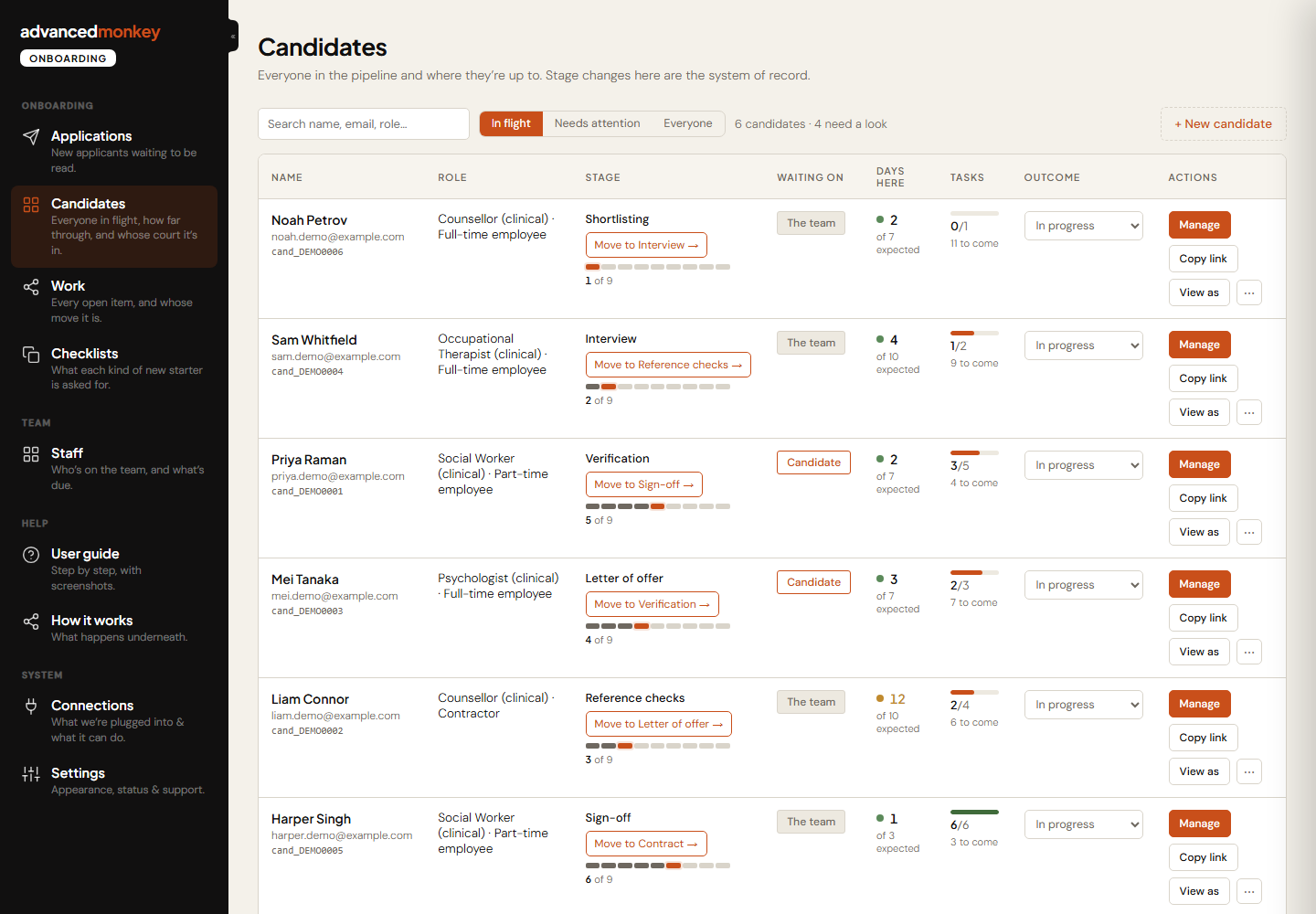
Every candidate on one board with their stage, how many days they've been in it, and who the next move belongs to. The owners don't watch the board. It surfaces the one that has stalled, and that's their cue to step in.
The candidate's own page
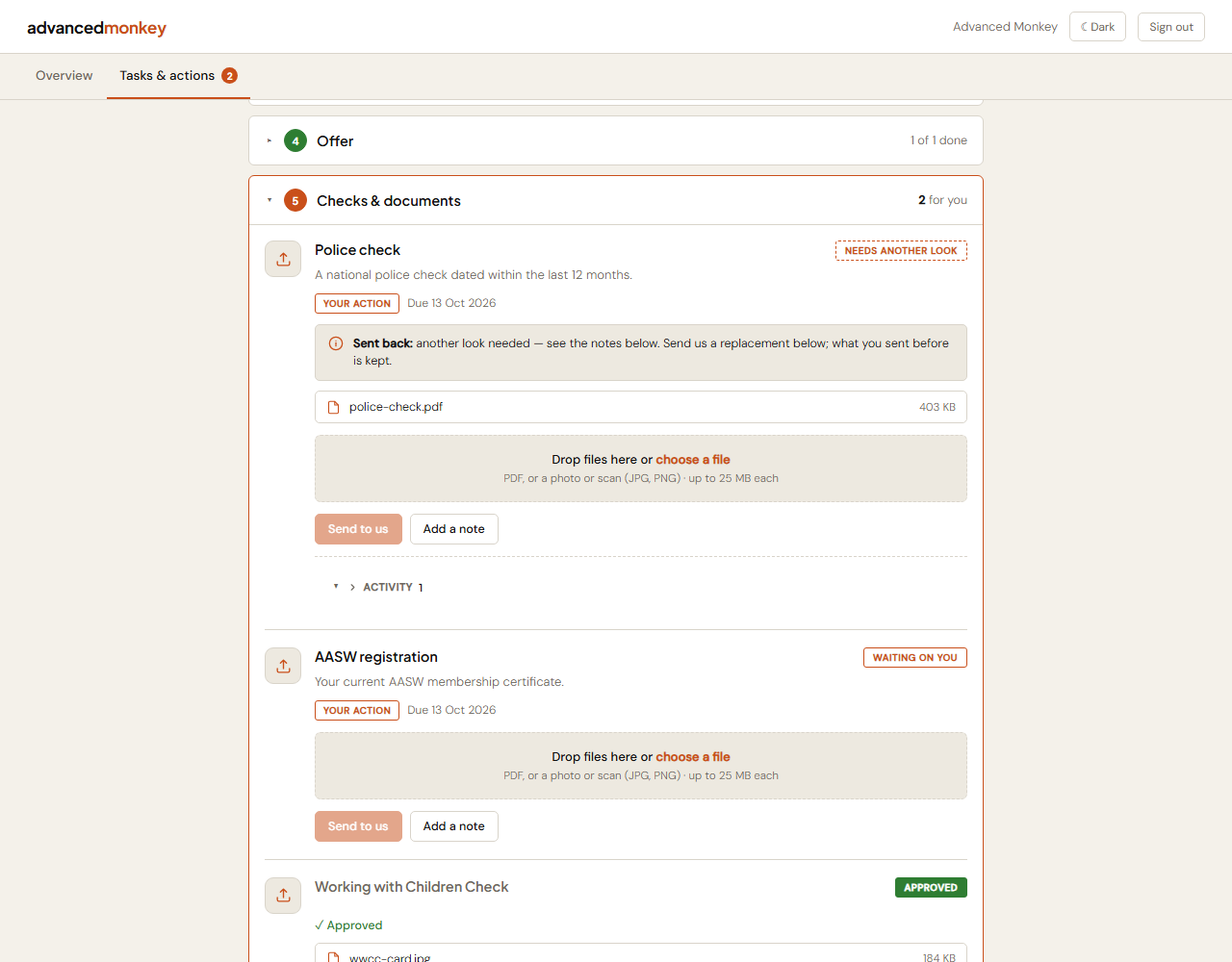
A candidate signs in with a link from their email, sees only their own record, and uploads each document once against the item it belongs to. If something needs redoing, the request and the redo happen on the same page, not in a new thread. Letters of offer and contracts are generated from the practice's own templates, signed and returned in the same place.
Gates that fail closed
Leaving Reference checks with a referee still open, or leaving Sign-off before the owners have confirmed the evidence, is refused, not warned about. Every other stage warns and lets the team decide. Documents are filed to SharePoint only when they're accepted, so the library never fills with half-finished folders.
Employee or contractor, one pipeline
The engagement type is set once and drives what's required. A contractor social worker needs an ABN and insurances and their AASW registration. One pipeline with conditional branches, not two parallel processes to maintain.
The register that keeps running after day one
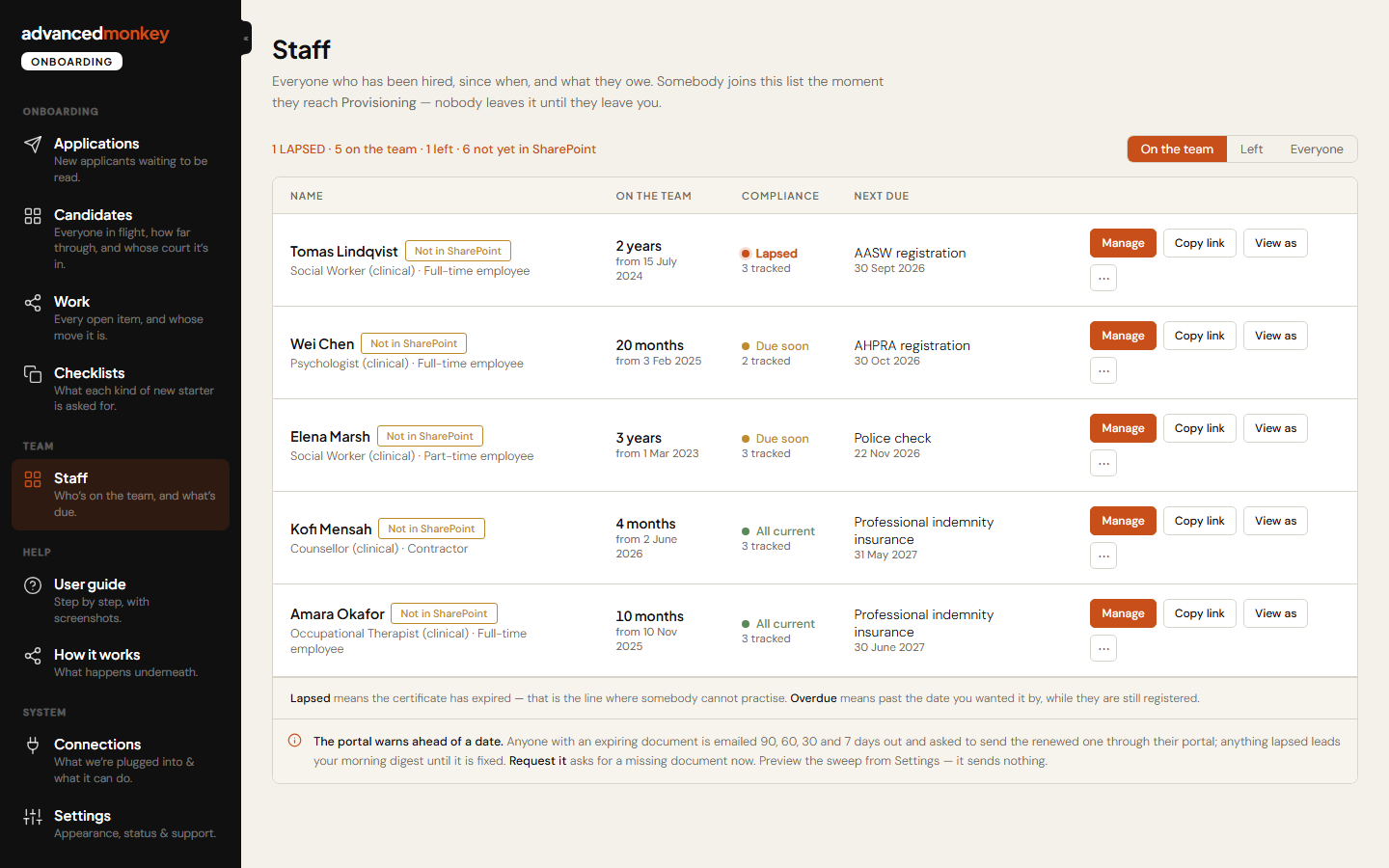
Police checks, Working with Children Checks and AHPRA and AASW registrations all expire. The portal tracks each one and a daily reminder engine emails the person it belongs to, and the team, as the date approaches. A renewed check updates the existing record instead of adding a second one, so the register stays true.
Three screens, one hire
The real portal, captured with demo data. No candidate names or documents from the practice appear anywhere on this page. Scroll through the story.
You're thinking
"Who's holding this hire up right now?"
01
The board
Every candidate, their stage, how many days they've been in it, and whose court it's in, worked out from the record rather than typed in. The one that has stalled surfaces on its own.
You're thinking
"Won't the candidate get lost in the threads?"
02
The candidate's page
One link from their email, only their own record, each document uploaded once against the item it belongs to. A redo is asked for and done on the same page, not in a new thread.
You're thinking
"And once they've started?"
03
The register
Everyone hired, their tenure, their compliance state and the next document due. Police checks and registrations are tracked to expiry, with reminders to the clinician and the team.
Verification, Then and Now
The worst loop, before and after
Before — every hire
- Four documents requested across four email threads
- Unreadable scans bounced back, and the thread forks
- Expiry dates noted somewhere, or nowhere
- Files saved to whichever inbox they landed in
- "Have we got everything?" answered by scrolling
After
- One page, one upload per document, against the right item
- A redo is requested and done on the same page
- Expiry recorded at verification, reminders from then on
- Filed to SharePoint on acceptance, tagged by type and candidate
- The stage can't advance until the list is complete
The Scope
Who it changes things for
| Audience | What changed for them |
|---|---|
| Owners | Sign-off is theirs alone, and the board tells them who's holding a hire up without asking anyone |
| Admin | Chasing becomes a status on a record instead of a thread to remember; letters and contracts come from templates |
| Candidates | One link, one page, upload each thing once, sign in the same place |
| The data | Lives in the practice's SharePoint, one record per person; nothing sensitive, which stays in Xero |
| IT | Runs in their own Microsoft 365 and Cloudflare accounts. The app can write to one SharePoint site and nothing else. Staff sign in with Microsoft |
| After day one | Registrations and checks tracked to expiry, with reminders to the clinician and the team |
What It Changes
Built for a few hires a year, and the years after
The process was approved by the owners in September 2026 and the portal is being rolled out with the team now, admin flow first, then the staff side on top of it. We'll add the numbers once a few hires have been through it. The shape, though, is already clear: the work that used to be invisible is on one board, and the two steps that matter most can't be skipped.
This is the Onboarding part of AM-OS. The same build is available to any business that hires a few people a year and checks them properly: set up in your own accounts, half to book and half at go-live, then yours to keep.
A few hires a year is exactly
when it's worth a system.
A free 30-minute call. Tell us how a new hire moves through your business today, and we'll tell you what one place for it would look like.